Key Takeaways
- RFID access control replaces physical keys with auditable, contactless authentication tied to individual credentials
- Two frequency types matter: 125 kHz handles basic proximity reads; 13.56 MHz supports encrypted smart cards for higher-security environments
- Fail-safe vs. fail-secure lock selection depends on the specific opening's fire egress and security requirements
- RFID extends well beyond doors in manufacturing — governing machine access, confirming operator identity, and capturing production data at the source
- Networked systems support real-time credential revocation — deactivating a lost card takes effect immediately
What Is RFID Access Control and How Does It Work?
RFID access control uses radio frequency identification to authenticate users and grant or deny entry to secured areas, machines, or workstations — no physical key required. Each credential (card, fob, or wristband) carries a unique identifier that a reader captures wirelessly when the user presents it. On a production floor that same read can do more than open a door: it identifies the operator, attaches the ERP job context, and triggers the next correct step, which turns an access event into an execution signal rather than another entry in a log.
The Authentication Sequence
Per NIST's physical access control documentation, the process follows a consistent chain:
- The credential enters the reader's RF field
- The reader captures the credential data and forwards it to the controller
- The controller evaluates the access rules and permission database
- An authorized match releases the door lock or activates the relay
- The system logs the transaction automatically with a timestamp
Step five is what a mechanical key can never replicate. Every entry attempt — successful or denied — generates a timestamped record tied to that individual credential.
Frequency Types and Security Tradeoffs
| Frequency | Examples | Security Level |
|---|---|---|
| 125 kHz (LF) | HID Prox, Schlage Proximity | Legacy — identifier only, no encryption |
| 13.56 MHz (HF) | MIFARE, DESFire, iCLASS | Varies by card generation and configuration |
| 13.56 MHz — DESFire EV3 | NXP MIFARE DESFire EV3 | AES-128 encryption, Common Criteria EAL5+ certified |
For most manufacturing environments, 125 kHz proximity cards work for general door access. Restricted areas — server rooms, tool cribs with high-value tooling, or ITAR-controlled spaces — warrant 13.56 MHz encrypted smart cards.
Fail-Safe vs. Fail-Secure Locks
This distinction matters for both safety compliance and security design:
- Fail-safe: Power holds the lock closed; cutting power releases it. Required on fire-exit paths where occupants must always be able to leave.
- Fail-secure: Power holds the lock open; cutting power locks it. Appropriate for high-security areas like server rooms or restricted manufacturing zones where an unlocked door during a power event is unacceptable.
Allegion's guidance and NFPA 101 address specific egress arrangements. Always confirm the correct mode with your local authority having jurisdiction before specifying hardware.
Key Components of an RFID Access Control System
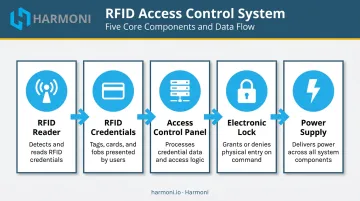
Five functional blocks make up any complete installation:
| Component | Role |
|---|---|
| RFID Reader | Energizes the credential and forwards data to the controller |
| RFID Credentials | Cards, fobs, or wristbands carrying the unique identifier |
| Access Control Panel/Controller | Stores permissions, evaluates access decisions, drives relay outputs |
| Electronic Lock | Magnetic lock or electric strike; wired to the controller's relay terminals |
| Power Supply | Typically 12 VDC, though PoE and 24 VDC options exist depending on hardware |
The Role of Access Control Software
Software is the management layer where everything is administered. Through the platform, administrators:
- Enroll new credentials and assign user details
- Configure time-based access schedules by shift or role
- Monitor real-time access logs and export records for audits
- Revoke credentials instantly when an employee leaves or a card is lost
Deployment options range from on-premise to cloud-hosted — the right choice depends primarily on how many doors you manage and whether remote administration matters to your operation.
Standalone vs. Networked Controllers
Standalone controllers store credentials locally and work well for single-door applications. Schlage's offline solution supports up to 2,000 users across 50 locks. Programming requires a handheld device or master card.
Networked controllers scale to fit manufacturing facilities with multiple access points. The HID Aero X1100C, for example, handles up to 250,000 cardholders and 64 readers per system. Networked architecture enables centralized management, real-time monitoring, and instant credential changes across every door simultaneously.
How to Install an RFID Access Control System (Step-by-Step)
Step 1 — Plan Your Access Points
Before touching any hardware, document every entry point and restricted area requiring controlled access. Confirm power availability at each location, map cable routes, and decide whether standalone or networked architecture fits the facility's scale and security requirements.
Step 2 — Mount Hardware and Run Wiring
Mount RFID readers beside the door or workstation, following the manufacturer's installation guide for height. Note that the US Access Board specifies an unobstructed reach maximum of 48 inches (1.22 m) for operable parts. Verify mounting height against your adopted accessibility code and the reader's installation manual.
For cabling:
- Wiegand connections support runs up to approximately 500 ft for legacy installations
- OSDP over RS-485 offers bidirectional, supervised communication with Secure Channel support and runs up to 4,000 ft — the preferred interface where both devices support it
- Ethernet connections (Cat5e UTP or Cat6 STP) follow standard 100-meter segment limits
Step 3 — Connect the Access Control Panel
Wire the reader and lock to the control panel, connect the power supply, and install exit request buttons inside the secured area. The Form-C relay terminals determine how the lock behaves under power — get these wrong and the lock fails in the wrong state:
| Terminal | De-energized State | Typical Use |
|---|---|---|
| COM | Moving/common contact | Common supply connection |
| NO | Open from COM | Power-to-unlock (fail-secure strike) |
| NC | Closed to COM | Power-to-lock (fail-safe magnetic lock) |
Incorrect terminal selection is one of the most common wiring errors — confirm lock type before connecting.
Step 4 — Install and Configure Software
Install the access control management software on a local server or connect to the cloud platform. Log in with default administrator credentials and change the password immediately. Run a connection diagnostic to confirm the reader communicates with the software before enrolling any credentials.
Step 5 — Test the Full System
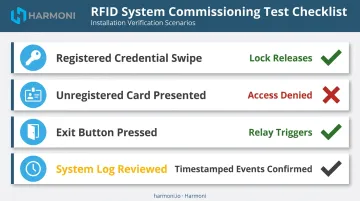
Commission only after running each scenario end to end:
- Swipe a registered credential → confirm the lock releases
- Present an unregistered card → confirm denial
- Press the exit button → confirm the relay triggers correctly
- Check the system log → confirm every event is captured with a timestamp
How to Program and Manage User Permissions
Enrolling RFID Credentials
In the access control software, navigate to the user or card management section. Tap or swipe the credential on the enrollment reader to capture its identifier, then assign user details — name, employee ID, and role — and save the record to activate access.
Two enrollment methods exist depending on your controller type:
- Master programming card (offline controllers): Tap the master card → tap the new user card → tap the master card again to confirm. Schlage's ENGAGE system uses this workflow for offline lock programming.
- Software-based enrollment (networked systems): Faster, supports bulk imports, and changes take effect across all connected readers immediately.
Setting Time-Based Access Rules
Time schedules restrict when each credential is valid — not just where. Practical configurations include:
- Shift workers: access valid 6 AM–6 PM, weekdays only
- Security personnel: 24/7 access across all zones
- Temporary visitors: credential with a hard expiration date that locks out automatically
Time schedules work alongside zone-based permissions to enforce a least-privilege model. A floor operator's credential might open the production area but not the tool crib, quality lab, or executive offices. Configure separate permission profiles for each role and assign credentials accordingly.
Monitoring Access Logs and Revoking Access
Access logs capture timestamped records of every entry — successful or denied. Set up alerts for repeated failures or access attempts outside scheduled hours — these patterns often indicate a lost credential being tested or a schedule misconfiguration.
Revoking access is simple: locate the user record in the software and deactivate or delete the credential. For networked systems, this change propagates immediately — a lost or stolen card stops working within seconds, not hours.
RFID Access Control in Manufacturing: Beyond the Door
In a manufacturing environment, access control's job doesn't end at the building entrance. CNC machines, tool cribs, quality labs, and restricted workstations all carry risk when operated by untrained or unauthorized personnel. OSHA's machine safeguarding guidance reports approximately 18,000 serious machinery injuries annually — and controlling who can activate specific equipment is one of the most direct ways to reduce that exposure.
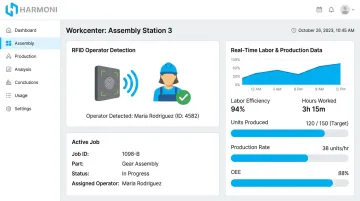
RFID-based operator authentication addresses this by connecting identity to the machine itself. When an operator presents their credential at a workcenter, the system records who is present, when they arrived, and what job is running. That data feeds labor costing, attendance tracking, and production reporting in real time — not after the shift, but as work happens.
Harmoni's factory orchestration platform uses RFID to automatically detect nearby employees and active jobs at workcenters, connecting operator identity to production data without manual badge-in steps. That identity link is what makes downstream data — labor costs, job histories, compliance records — actually trustworthy.
Integration with ERP and MES Systems
When RFID events at machines connect to ERP and MES workflows, the benefits compound. A credential scan at a workcenter can:
- Trigger job start/stop transactions in the ERP automatically
- Feed labor data directly into costing calculations
- Create traceable records of which operator ran which job and for how long
- Flag unauthorized machine access or usage outside scheduled shifts for manager review
A 2024 case study from Production Machining highlights how RFID operator authentication adds the otherwise missing "who" to machine monitoring records — and how that identity data can restrict machine use based on operator authorization.
For manufacturers running Epicor, Infor, JobBoss2, or similar ERP platforms, Harmoni's integrations make this data flow bidirectional — replacing paper-based operator tracking and the transcription errors that come with it.
Troubleshooting Common RFID Access Issues and Maintenance Best Practices
Common Troubleshooting Issues
1. Card not recognized
- Confirm the card frequency matches the reader — a 125 kHz card will not communicate with a 13.56 MHz-only reader. These are hardware incompatibilities, not software fixes.
- Verify the credential is enrolled in the system with active permissions.
2. Door not unlocking despite card approval
- Inspect relay wiring and confirm the correct NO or NC terminal is connected for the lock type.
- Check power supply voltage — insufficient voltage to the lock is a common cause of intermittent failures.
3. Software not detecting the reader
- Verify the network or USB connection is active.
- Check firewall settings that may be blocking the controller's communication port.
- Restart the reader or controller and re-run the connection diagnostic.
Maintenance Best Practices
Consistent maintenance catches most field failures before they reach the floor:
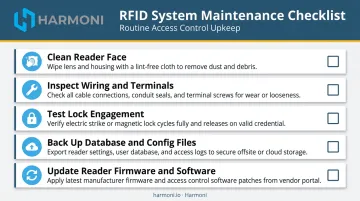
- Clean reader faces with a dry cloth — dust and debris directly degrade RF read performance
- Inspect wiring connections and power supply terminals for corrosion or loosening at each scheduled interval
- Test lock engagement and release to catch mechanical wear early
- Back up the access control database and configuration files on a fixed schedule
- Update reader firmware and software when the vendor releases patches — HID Reader Manager, for example, handles firmware management for Signo readers through HID's cloud services portal
Follow the specific cleaning and maintenance intervals in your reader's installation manual rather than a generic schedule — environmental conditions vary significantly across manufacturing facilities.
Frequently Asked Questions
What is RFID in access control?
RFID (Radio Frequency Identification) in access control uses radio waves to wirelessly authenticate users via cards, fobs, or tags, replacing physical keys with contactless, auditable entry management. Each credential carries a unique identifier that the reader captures and forwards to a controller for an access decision.
What are the main components of an RFID access control system?
The five core components are: an RFID reader, RFID credentials (cards or fobs), an access control panel or controller, an electronic door lock, and management software that handles user enrollment and permission settings.
How do I add or remove users from an RFID access control system?
Adding a user requires enrolling a new credential in the access control software — tap it on the reader to capture its identifier, assign permissions, and save. Removing a user requires deactivating or deleting that credential record, which takes effect immediately on networked systems.
What is the difference between fail-safe and fail-secure RFID locks?
Fail-safe locks release (unlock) when power is cut, making them appropriate for emergency exit paths. Fail-secure locks stay locked without power, making them better suited for high-security zones like server rooms or restricted manufacturing areas. Always verify the correct type against your egress code requirements.
Can RFID access control integrate with ERP or manufacturing systems?
Yes. Networked RFID systems integrate with ERP, MES, and factory orchestration platforms to trigger job starts, automate labor data collection, and give managers visibility into who is operating which machine and when. Platforms like Harmoni connect RFID operator identity directly to ERP workflows for Epicor, Infor, JobBoss2, and similar systems.
How do I troubleshoot an RFID card that won't grant access?
Run through these three checks first:
- Confirm the card is enrolled with active permissions in the software
- Verify the card's frequency matches the reader (125 kHz and 13.56 MHz are not interchangeable)
- Confirm the user's time-based access schedule covers the current day and hour