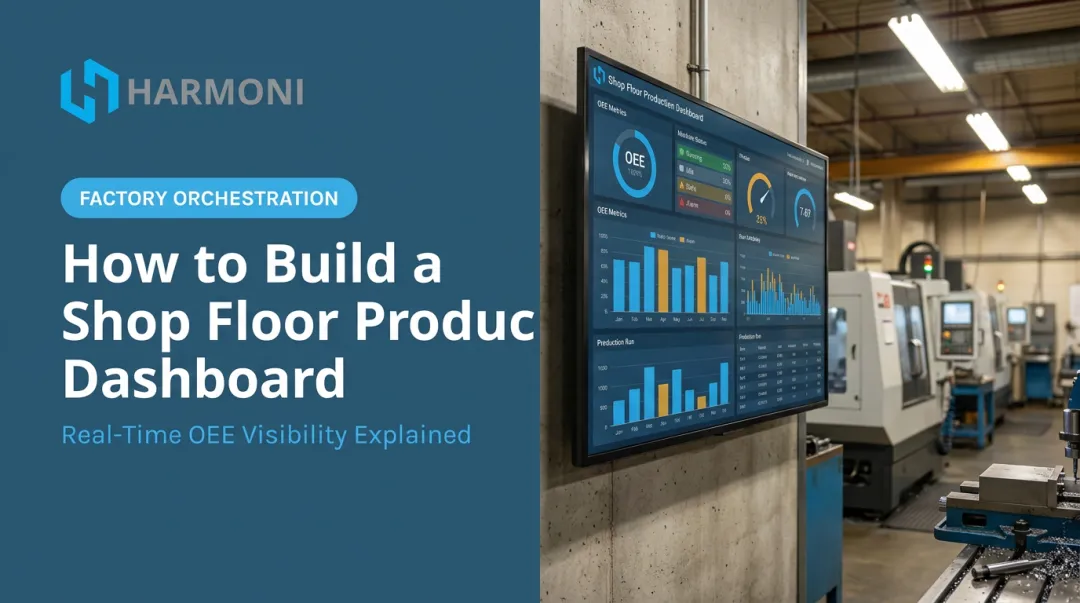
Setting up a digital lean board is not a simple software install. Complexity scales with how many systems, meaning your ERP, MES, and machine controls, need to feed it live data. Rushed rollouts turn boards into static "digital spreadsheets" that go stale fast, and operators quietly revert to whiteboards within weeks.
This guide walks through planning, configuring, and launching a digital lean board that actually drives daily management behavior, not just another screen on the wall.
Key Takeaways
- Setup difficulty depends on integration scope, not the board software itself
- Defining 5-7 KPIs before picking a platform matters more than the hardware you select
- Real-time production data separates a true lean board from Treating this as an IT project, not a Lean initiative, causes most failures
Prerequisites and Tools for Setting Up a Digital Lean Board
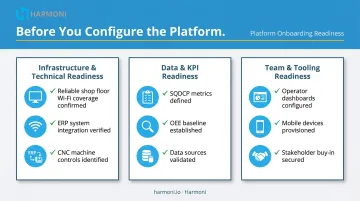
Before configuring any platform, three things need to be in place: technical infrastructure, clean data sources, and team commitment to a daily meeting routine. Skip any one of these and the board becomes decoration.
Infrastructure and Technical Readiness
Confirm where the board needs to live and how people will interact with it:
- Display placement: shop-floor monitors, touchscreens, or mobile/tablet access at the point of use
- Connectivity: reliable network coverage reaching the floor, not just the office
- System compatibility: which ERP (Epicor, Infor, JobBoss, ABAS, ODOO) and which machine controls (Fanuc, Haas, Mazak, Siemens, Heidenhain) need to feed the board
The setup usually falls to a continuous improvement lead or production manager, supported by IT and, for deeper integrations, a technology vendor. IT alone rarely gets this right because the board's success depends on operator behavior, not just uptime.
Data, Process, and Tooling Readiness
Define a small, focused set of KPIs before touching any software. Many teams use an SQDCP-style structure: Safety, Quality, Delivery, Cost, People, though you'll find variants like SQDCM or QCDSM used across the industry. The letters matter less than the discipline behind them.
One non-negotiable: don't digitize a metric nobody can influence daily, or one built on unreliable manual data entry. A KPI that's already unreliable on paper will just be unreliable faster on a screen.
With KPIs defined, assemble the tools to support them. At minimum, you need:
- A visual board/dashboard platform built for shop-floor use
- Display hardware appropriate to the space
- Mobile input for shift-floor logging
Optional additions include RFID or badge-based job detection and an integration layer connecting multiple systems. Start with one ERP integration and a single screen. Scale hardware and integrations only after the daily routine sticks, not before.
How to Set Up a Digital Lean Board (Step-by-Step)
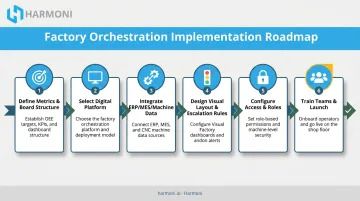
Setup follows a defined sequence. Buying screens before defining KPIs or mapping data flow is the single most common cause of failed rollouts.
Step 1: Define Metrics and Board Structure
Select 5-7 KPIs teams can act on every shift. Map each one to a clear visual layout showing status, target versus actual, owner, and deadline. If a metric doesn't fit that structure, it doesn't belong on the board yet.
Step 2: Select a Digital Board Platform
Decide whether a simple visualization tool is enough, or whether the operation needs a broader layer unifying ERP, MES, and machine data. Most mid-to-large, multi-system manufacturers need the latter: a single-line job shop can get by with a lightweight dashboard, while a facility running multiple ERPs across several cells cannot.
Step 3: Integrate with ERP, MES, and Machine Data Sources
Connect the board directly to production systems and machine controls so status updates automatically instead of through manual entry. This is where most digital boards quietly fail, because manual keying just moves the stale-data problem from paper to screen.
Platforms like Harmoni sit between ERP, MES, machines, and operators, pulling real-time data into one unified view so problems surface while production is happening, not after the shift ends.
Harmoni's automation pillar uses long-range RFID to detect an operator and job automatically at the machine, starting labor tracking and pulling the correct CNC program without anyone touching a keyboard. It works alongside existing ERP and MES systems rather than replacing them.
Step 4: Design the Visual Layout and Escalation Rules
Set clear visual indicators (green and red status is most common) and place actions with owners and deadlines directly on the board. Define exactly how unresolved issues escalate:
- Line level: supervisor addresses it within the shift
- Area level: value stream or department lead gets involved if unresolved
- Plant level: plant manager sees it if it crosses a defined threshold
Step 5: Configure Access, Roles, and Mobile Input
Set permissions so operators can log issues from the floor via mobile or tablet, while restricting sensitive cost or performance data to the roles that need it. Defense and aerospace shops handling ITAR or CMMC requirements should confirm the platform supports the access controls those environments demand.
Step 6: Train Teams and Launch with a Daily Meeting Routine
Pilot on one line or cell first. Train supervisors to run the meeting around the board rather than simply displaying it, meaning they call on the data, assign actions, and follow up the next day. Scale to other areas only once the habit is established.
Post-Setup Validation: Confirming the Board Is Working
A technical test is not the same as proof the board works. A few things need confirmation before you trust it for real decisions:
- Data accuracy — feeds from ERP, MES, or machines update correctly without manual correction
- Meeting output — the daily meeting produces assigned actions with owners and deadlines, not just a KPI review
- Escalation flow — red metrics trigger the right escalation path immediately, not silent entries no one reviews until the next shift
Skip this validation step and problems tend to surface weeks later, showing up as stale data nobody flagged, missed escalations, or a board that's technically online but functionally ignored. Run a few weeks of live shift meetings before declaring the rollout complete.
If supervisors aren't naming an owner and a date for every red metric, the board isn't validated yet, no matter how clean the data looks.
Common Setup Challenges and How to Fix Them
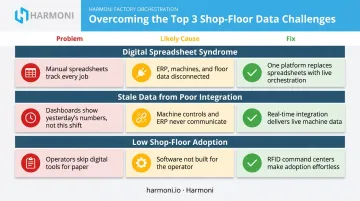
Issue 1: The Board Becomes a "Digital Spreadsheet"
The problem: The board is technically online but feels rigid and uninviting, little more than an Excel sheet on a bigger screen.
Likely cause: Choosing a general reporting tool instead of a platform built for touch-friendly, visual shop-floor use.
Fix: Prioritize platforms designed for daily visual management, not spreadsheet-style reporting. Color-coded status indicators and machine-side interaction beat rows of numbers every time.
Issue 2: Stale Data from Poor Integration
The problem: The board shows outdated numbers, so operators stop trusting it and stop looking at it.
Likely cause: No real integration layer. Data is still being manually keyed in from ERP or machine logs after the fact.
Fix: Use an integration layer that automatically syncs ERP, MES, and machine data. Deloitte warns against exploring digital tools before targeting a specific operational problem, a trap it calls pilot purgatory. A board built on manual entry never escapes it.
Issue 3: Low Shop-Floor Adoption
The problem: Operators ignore the board and meetings feel like a checkbox exercise.
Likely cause: The board was introduced without changing how the daily meeting is actually run.
Fix: Tie the board directly to the meeting routine, assign clear owners for every metric, and expand only after the pilot area shows consistent, repeated use.
Pro Tips for a Digital Lean Board That Actually Gets Used
- Start small. Pilot on a single line or cell, then use what you learn to refine layout and KPIs before rolling out company-wide
- Keep ownership with operations and CI leads, not IT. IT should support the platform, not dictate what appears on it
- Document your configuration decisions, including KPI definitions, escalation rules, and integration mappings, so setup is repeatable across other lines or plants
- Remember that setup quality, not hardware, decides outcomes. Disciplined prerequisite work and honest validation pay off far more than a bigger touchscreen
Frequently Asked Questions
What is digital lean?
Digital lean uses connected digital tools to run traditional Lean practices, such as visual management, daily meetings, and problem-solving, with real-time data instead of paper or spreadsheets. It applies technology to existing Lean routines rather than replacing them.
What is a lean board?
A lean board is a visual tool used in daily meetings to track KPIs, flag deviations, and assign follow-up actions. It can be physical or digital, but either way it supports the daily management process rather than replacing it.
What are the 7 elements of lean?
Most commonly, this refers to Taiichi Ohno's seven wastes of the Toyota Production System: overproduction, waiting, transportation, over-processing, inventory, motion, and defects. A digital lean board makes waiting, defects, and overproduction easier to spot in real time.
How long does it take to set up a digital lean board?
A basic single-line setup can often launch within a few weeks. Full ERP, MES, and machine integration across multiple lines takes considerably longer, depending on how many systems and controls need to connect.
Do I need to get rid of my physical lean boards to go digital?
No. Many teams run both during the transition, and some keep physical boards for informal use while digital boards handle KPI tracking and escalation. Hybrid use is often a deliberate long-term strategy rather than a temporary stopgap.
Can a digital lean board integrate with my existing ERP or MES system?
Yes, most modern digital lean platforms and orchestration layers support integration with common ERP, MES, and machine control systems. That real-time connection is what separates a true digital lean board from a basic dashboard.