Introduction
Picture this: a CNC machine's cycle time drifts 15% below rated speed. Nobody notices. An hour passes, then two. By the time the end-of-shift OEE report shows a dip, that production time is gone for good.
This scenario plays out on shop floors every day. Most plants still treat OEE as a report card, something you review after the damage is done, rather than a trigger for action while it's still happening.
That's the gap an OEE alert closes. This article breaks down what an OEE alert actually is, the different types manufacturers rely on, and why they matter to your bottom line. You'll also learn how to set one up without launching a massive IT project.
Key Takeaways
- OEE alerts trigger instantly when availability, performance, or quality crosses a set threshold
- Alerts turn OEE from a lagging score into an actionable, mid-shift indicator
- The best alerts include reason codes and route straight to the right person
- Pairing machine signals with operator and job context makes alerts far more useful
What Is OEE? A Quick Refresher
Overall Equipment Effectiveness (OEE) is the standard KPI for measuring how well equipment converts planned production time into good output. Per ISO 22400-2:2014, the formula is:
OEE = Availability × Performance × Quality
Each component answers a different question:
- Availability: Actual runtime divided by scheduled operating time. Did the machine run when it was supposed to?
- Performance: Actual output speed divided by rated speed. Did it run at the pace it's designed for?
- Quality: Good parts divided by total parts produced. Did the output meet spec?
A single OEE score, say 76%, is a composite number. It tells you something went wrong during the shift, but not what, not when, and not which machine or job was affected. That's the limitation an OEE alert is built to solve: turning a backward-looking percentage into a real-time, actionable signal.
What Is an OEE Alert?
An OEE alert is an automated notification that fires the instant OEE, or one of its three underlying components, breaches a defined threshold or a specific shop-floor event occurs. It's the difference between measuring a problem and catching it as it develops.
The distinction matters:
| Type | Example | When You Find Out |
|---|---|---|
| Score | Shift-end OEE of 72% | After the shift ends |
| Signal | Alert fires when cycle time slips below rated speed or downtime crosses five minutes | While there's still time to act |
Common Alert Triggers
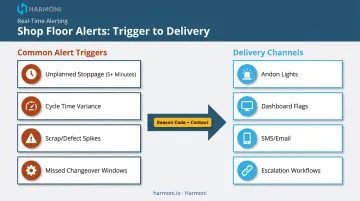
Most manufacturers configure alerts around a short list of high-signal events:
- Unplanned stoppage beyond a defined time limit (for example, 5+ minutes)
- Cycle time variance against ideal or rated speed
- Scrap or defect rate spikes
- Missed changeover windows
How Alerts Get Delivered
Delivery channels vary by plant maturity. Common methods include:
- Andon lights on the machine itself
- Dashboard flags visible to supervisors
- SMS or email pings to designated staff
- Escalation workflows tied into maintenance systems
A generic beep with no context doesn't drive action. An alert only becomes useful when it's tied to a reason code and a specific machine, operator, and job. Without that context, operators and supervisors end up guessing what happened and where, which defeats the purpose of real-time alerting in the first place.
Real-time visibility isn't just a nice-to-have, either. An LNS Research survey of nearly 400 manufacturing and industrial executives found that companies with real-time visibility into quality metrics reported 6% higher OEE than those without it. Visibility alone moves the needle. Alerting is what makes that visibility actionable in the moment, not just informative after the fact.
Types of OEE Alerts and What Triggers Them
Not all OEE alerts look the same. Each of the three OEE components has its own alert logic, and mature systems layer on additional alert types for scheduling and escalation.
Availability alerts fire when:
- Unplanned downtime exceeds a threshold (commonly 5+ minutes)
- A changeover runs longer than its standard time
Performance alerts fire when:
- Actual cycle time drops below a set percentage of rated speed
- Minor stops or idling events accumulate past a defined count
Quality alerts fire when:
- Scrap or rework rates cross a defined limit
- Consecutive defective parts appear within a single run
Schedule and attainment alerts are a bit different. Instead of measuring a single component, they compare current output pace against the rate needed to hit a shift or order target. If the pace falls behind, the alert flags a likely missed deadline before it actually happens.
Static vs. Dynamic Alerts
- Static (fixed-threshold) alerts use a hard number, such as "alert if OEE drops below 70%," though the same threshold can be too strict for an aging machine and too loose for a new one.
- Dynamic (anomaly-based) alerts compare current performance against a machine's own historical baseline, flagging deviation instead of a fixed number, and adapt better across a mixed fleet of equipment.
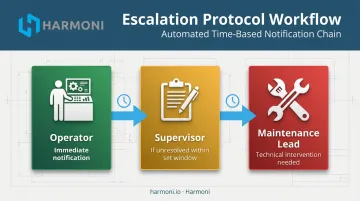
Tiered Escalation Alerts
The best alerting systems don't stop at a single notification. They escalate:
- Operator first: the person closest to the machine gets notified immediately
- Supervisor next: if the issue isn't resolved within a set time window
- Maintenance lead: for issues that clearly need technical intervention
This tiered structure keeps small issues from silently sitting unresolved for an entire shift.
Why OEE Alerts Matter for Manufacturers
The math on downtime is brutal. Unplanned downtime costs industrial manufacturers an estimated $50 billion annually, according to Deloitte, and poor maintenance practices alone can shave 5% to 20% off a plant's productive capacity. Every minute an issue goes undetected adds to that total.
From Firefighting to Prevention
There's a real cultural shift happening as more plants adopt real-time alerting. Instead of discovering a problem in an end-of-shift report, teams catch it while it's still unfolding.
KitchenAid's Greenville, Ohio machining operation is a good illustration. After adopting machine- and shift-level OEE tracking, the plant moved OEE from the 60s and 70s into the mid-to-high 80s, with availability consistently hitting 90% or better. Disciplined, real-time visibility into performance drove that improvement, not alerts by themselves.
Accountability, Quality, and Job Costs
When an alert is tied to a specific workcenter and operator, there's no guessing after the fact about who was assigned when an issue occurred. That accountability changes behavior on its own, particularly in shops running multiple jobs per shift.
Quality alerts carry similar weight. They stop a bad run before hundreds of defective parts pile up, protecting job costing accuracy in the process.
Undetected scrap doesn't just waste material - it inflates the labor and material cost tied to a job long after the order's already been quoted, eroding margins on work that looked profitable at quote time.
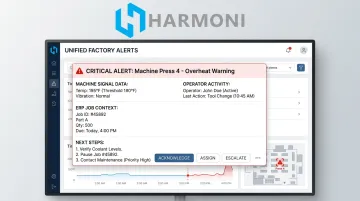
All of this depends on how fast problems surface. Basic OEE alerts only tell you what went wrong, and this is where Harmoni's factory orchestration platform adds a layer most standalone monitoring tools don't.
By combining machine data with operator activity and ERP job context, an alert includes who's on the job, what the order requires, and what to do next, rather than just a bare notification.
Best Practices for Setting Up Effective OEE Alerts
Effective OEE alerting requires precision, not blanket notifications for every possible event.
Key practices for building an alert system that actually works:
- Set thresholds per line, not plant-wide. Equipment age, changeover frequency, and production mode all change what "normal" looks like for a given machine.
- Limit alert volume. Alert fatigue is real, so focus on a handful of high-signal thresholds tied to your top loss categories instead of flagging every minor fluctuation.
- Route alerts deliberately. Send each alert to the right person through the right channel, and build in escalation so unresolved issues don't sit ignored for a full shift.
- Skip the IT overhaul. You don't need to rip out your ERP or MES to get this working.
Platforms like Harmoni sit between your ERP, MES, machines, and operators, automating the routing without touching your core systems. Because Harmoni retrofits to existing CNC controls, deployment typically takes weeks rather than months. If you want to see how that works with your current setup, checking machine compatibility is a good first step.
Frequently Asked Questions
What is OEE in KPI?
OEE (Overall Equipment Effectiveness) is a composite manufacturing KPI calculated as Availability x Performance x Quality. It gives you a single percentage reflecting how effectively equipment converts planned time into good output.
What triggers an OEE alert?
Common triggers include extended unplanned downtime, cycle speed dropping below a rated threshold, scrap or defect rate spikes, and output pace falling behind the target needed to hit a schedule.
How is an OEE alert different from a downtime alert?
A downtime alert only flags stoppages, which is an availability issue. An OEE alert can be triggered by any of the three components: availability, performance, or quality.
What's a good threshold for OEE alerts?
There's no universal number. OEE.com traces the 85% "world class" benchmark to a 1984 study of Japanese auto plants, but says no single score fits every company — base your threshold on each line's own baseline.
Do OEE alerts require PLC integration or new hardware?
Not necessarily. Modern approaches, including clip-on sensors and orchestration platforms that retrofit to existing CNC controls, can capture machine signals without deep PLC integration or new hardware installs.
How do OEE alerts help improve job costing accuracy?
Catching downtime, speed loss, or quality issues as they happen prevents them from silently inflating labor and scrap costs on a job. That keeps your cost tracking much closer to what actually happened on the floor.