Introduction
Picture your most experienced machinist — the one who knows every quirk of the Haas, every tolerance that needs a second look, every workaround that keeps the line running. Now picture them calling in sick on a Monday morning with three jobs queued. What happens next tells you everything about the state of your process documentation.
Most manufacturers have documentation. The problem is it lives in a binder on a shelf, reflects how the process worked 18 months ago, and gets consulted about as often as the fire extinguisher. Process documentation only works when it's accurate, accessible, and actually used at the point of work.
Closing that gap is what this guide is about. It covers what process documentation is, the types used in manufacturing, what good documentation must include, and how to build it step by step — including why having documents is not the same as having a functioning system.
Key Takeaways
- Process documentation captures the exact steps, inputs, tools, and standards needed to execute a task — making knowledge transferable across your workforce.
- Manufacturing operations rely on multiple document types (SOPs, work instructions, routing sheets, control plans), each serving a different audience.
- Effective documentation is specific, accessible at the work center, and treated as a living record updated alongside process changes.
- Most operations don't lack documentation — they have documentation that goes unenforced or falls out of date.
What Is Process Documentation and Why Does It Matter
The Operational Definition
Process documentation is a structured record of how a specific task or workflow is performed. It captures the steps involved, their sequence, the tools or machines required, quality checkpoints, responsible roles, and expected outputs.
The distinction worth holding onto: a process document is prescriptive and operational, not informational. It tells an operator what to do, not just what the process is supposed to achieve.
In manufacturing, this means documenting how a CNC operator sets up a part, which in-process inspection checks must occur at which step, what tolerances are acceptable, and what to do when a measurement falls outside spec. Without that documentation, consistency depends entirely on individual memory and the willingness of experienced operators to share what they know.
That dependency is expensive. According to a 2024 Quality Magazine benchmark, a representative manufacturer with $50M in revenue can face total quality costs exceeding $2.5M — a figure that covers prevention, appraisal, and failure costs. Poor documentation drives much of that failure cost through unnecessary scrap, rework, and re-inspection.
What Good Documentation Delivers
Well-maintained process documentation produces measurable business outcomes:
- Reduced scrap and rework — operators follow consistent, correct procedures rather than improvising
- Faster onboarding — new hires can execute standard work without waiting for a veteran to shadow them
- Consistent quality across shifts — day shift and night shift produce the same result, not two different approximations
- Clearer accountability — when a defect occurs, the documentation shows exactly what should have happened and where the deviation occurred
Process Documentation vs. SOPs
Before building a documentation system, one terminology distinction matters: SOPs are one type of process document, not a synonym for the category. Standard Operating Procedures focus on regulatory or quality compliance at a procedural level. Process documentation is the broader category — it includes work instructions, routing sheets, control plans, and more. Each format serves a different function, and using the right one for the right situation is what separates an effective documentation system from a filing cabinet full of PDFs nobody reads.
The Types of Process Documentation Used in Manufacturing
The Four Primary Document Types
Manufacturing operations use four core document types, each serving a different audience and level of detail:
| Document Type | Audience | Detail Level | Primary Use |
|---|---|---|---|
| Work Instructions | Individual operators | Highest — step-by-step | Specific job, machine, or part number |
| Standard Operating Procedures | Department or function | Procedural | Category of activity (e.g., tool change, end-of-shift) |
| Process Maps / Flowcharts | Cross-functional teams | Visual / structural | Order-to-ship workflows, handoffs, decision points |
| Control Plans & Routing Sheets | Quality and planning | Specification-level | Inspection points, tolerances, operation sequences |
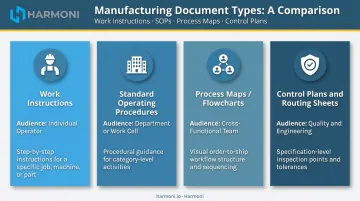
These four types layer on top of one another. SOPs set the procedural framework; process maps show how work moves between functions; work instructions bring that framework to the operator level; and control plans define what gets measured and to what standard. Understanding which document owns which decision is what keeps them from overlapping into noise.
The L1/L2/L3 Documentation Hierarchy
Many manufacturing and quality teams organize documentation into a three-level hierarchy — a common implementation convention rather than a mandated standard. ISO 9001:2015 gives organizations flexibility over documentation structure and does not prescribe specific level labels.
The typical mapping looks like this:
- L1 (Policy / Process Maps): The "what" — high-level quality policy, process scope, and system-level information
- L2 (Procedures / SOPs): The "how" at a department or function level — change management, audit procedures, tool change protocols
- L3 (Work Instructions): The "how" at the operator and task level — step-by-step execution for a specific part, machine, and operation
Some frameworks add an L4 level for records and completed forms. This hierarchy helps organizations control which documents require formal change management approval versus which can be updated at the supervisor level.
Closing the Gap Between Planning and Execution
Digital manufacturers connect these document types to live production data. Routing data from the ERP links directly to the work instruction displayed at the work center — so the operator sees the right document for the active job without searching for it. Without that link, operators default to tribal knowledge or outdated printouts — and the gap between what the plan says and what actually happens on the floor widens with every revision cycle.
What Effective Process Documentation Must Include
Strong manufacturing process documentation isn't defined by its format — it's defined by what it consistently contains. These structural requirements apply whether you're writing a work instruction, a setup sheet, or a standard operating procedure.
Formal Identification and Ownership
Every document needs:
- Title
- Version number
- Effective date
- Document owner
Without formal identification, operators can't confirm they're reading the current revision. A document with no version number is unmanageable and, ultimately, untrustworthy. Once that foundation is in place, scope becomes the next decision point.
Defined Scope and Purpose
A work instruction scoped too broadly becomes useless for any specific job. One scoped too narrowly creates a documentation burden too large to maintain. Define clearly which parts, operations, machines, or job types the document covers, and what outcome following it should produce.
Step-by-Step Instructions with Visual Aids
This is where most documentation fails. Effective shop floor instructions use:
- Numbered steps written at the operator's reading level
- Annotated photos or diagrams of the actual machine interface, part feature, or fixturing setup
- Specific action language: "torque fastener to 35 ft-lbs," not "ensure proper torque is applied"
A 2026 peer-reviewed assembly training experiment found that augmented-reality instructions produced a 33.2% decrease in error rate compared to traditional manuals. The underlying principle — that visual context reduces errors — holds across documentation formats, not just AR environments.
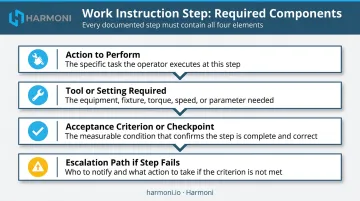
Each step should specify:
- The action to perform
- The tool or setting required
- The acceptance criterion or checkpoint
- What to do if the step can't be completed as described (escalation path)
Quality and Safety Requirements at the Step Level
In-process inspection criteria, tolerance callouts, safety precautions, and required PPE must appear within the document at the step where they apply, not in a separate section at the end that operators read once and forget. If the critical check happens at step 7, the inspection criteria belong at step 7.
How to Create Process Documentation: A Step-by-Step Approach
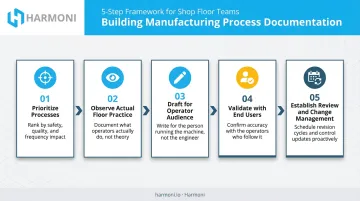
Step 1: Identify and Prioritize Which Processes to Document First
Don't try to document everything at once. Prioritize based on:
- Highest defect or rework rates — start where errors cost the most
- Inconsistent execution across operators — same job, wildly different results
- Single-point-of-failure knowledge — processes where one person leaving would cause serious disruption
Step 2: Observe the Process as It Is Actually Performed
Walk through the job with the operator performing it — not the engineer who designed it. The gap between how a process is supposed to work and how it's actually performed on the floor is almost always larger than expected.
Document what is actually done, including informal workarounds, before defining the standardized version. Lean practitioners call this the gemba: going to where the work happens.
Step 3: Draft with the Operator Audience in Mind
Write in plain, direct language using active verbs. Avoid engineering jargon in operator-facing work instructions. Photographs and diagrams should show the actual part feature, machine display, or fixturing setup — not generic illustrations. If the setup requires a specific offset on a Fanuc control, show the actual Fanuc screen.
A useful test: if a new operator can't follow the document without asking a question, it needs revision before it gets published.
Step 4: Validate with the People Who Will Use It
Have a different operator — ideally someone newer to the job — follow the documented steps without assistance. Where they hesitate, guess, or produce an incorrect result, the document has failed. Revise before publishing. This is the most commonly skipped step and the most consequential.
Step 5: Establish Review Cadence and Change Management
Define:
- How often documents are reviewed (at minimum annually; immediately when the process changes)
- Who is authorized to approve revisions
- How operators are notified of updates
- How outdated versions are retired from the work center
A document with no change management process will drift out of alignment within months. The written procedure and actual practice diverge fast — and once operators stop trusting the documentation, they stop using it.
Common Process Documentation Challenges in Manufacturing
Documentation Nobody Actually Reads
The most common failure mode: documentation exists on paper or a shared drive but is never accessed at the point of work. If retrieving the document requires leaving the work center, logging into a separate system, or asking a supervisor, it won't be consulted. Operators will rely on memory or ask the nearest veteran instead.
That's a documentation system design failure, not an operator behavior problem.
Version Drift
Process changes happen constantly: new tooling, revised tolerances, updated machine parameters. Those changes get communicated verbally or informally, but the written document never gets updated. Operators learn to distrust the documentation and fall back on tribal knowledge — a pattern that drives quality escapes, inconsistent output, and audit risk.
Version drift is particularly dangerous in regulated environments. NHTSA Recall 24V-205 (March 2024) illustrates the stakes: Hyundai's supplier had to formally correct its work instructions on February 23, 2024 as part of a production correction — and that correction became part of the regulatory record because work instruction accuracy is a production control failure point.
Signs that version drift has taken hold:
- Operators routinely ask colleagues instead of checking written procedures
- Supervisors maintain a separate "real" set of instructions separate from the official document
- Post-job debriefs regularly surface parameters that differ from what's on file
- Audit findings reference document revision levels that don't match shop floor practice
Documentation Too Generic to Be Useful
A work instruction that says "machine part per drawing" is not a work instruction — it assumes knowledge the operator may not have. Effective documentation specifies setup parameters, tool numbers, feeds, speeds, and inspection criteria relevant to the specific job. Generic procedures that apply broadly provide insufficient detail for operators to execute correctly, especially in high-mix, low-volume environments where every job is different.
Each of these challenges compounds the others. Inaccessible documents breed version drift; generic instructions invite workarounds. Solving them requires rethinking how documentation is created, maintained, and delivered — not just adding more files to a shared drive.
From Documentation to Real-Time Execution: Closing the Shop Floor Gap
Why Static Documents Aren't Enough
Static process documentation tells operators what to do. It provides no mechanism to verify it's being followed, flag deviations as they occur, or adapt when the floor situation doesn't match what the document describes. Under schedule pressure, even well-written documentation gets bypassed.
The manufacturing industry recognizes this gap. MarketsandMarkets forecasts global MES market revenue growing from $15.95B in 2025 to $25.78B in 2030 — a 10.1% CAGR driven in part by the push to connect documentation and data to live execution.
Moving from Documents to Live Coordination
Modern operations are moving toward systems that connect process documentation to production in real time — delivering the right work instruction to the right operator at the right work center based on the actual job running, rather than requiring operators to remember to look something up.
This is where Harmoni's factory orchestration platform addresses the gap directly. Rather than treating documentation as a separate system operators reference manually, Harmoni connects ERP job data, machine activity, and operator workflows through RFID-based identification.
When an operator approaches a work center terminal, the system detects the active job and automatically surfaces the correct work instructions, drawings, and setup sheets for that specific part, revision, and operation — without any manual searching.
Document delivery through RFID is only part of the picture. Harmoni's process control pillar enforces what reaches the work center in the first place:
- Only approved, current documents are surfaced to operators
- CNC program modifications trigger automatic alerts to the appropriate parties
- Modified versions require formal approval before becoming the current revision
- Every document interaction is logged for full traceability
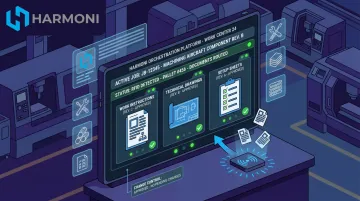
That closed-loop change control keeps documentation aligned with actual practice — eliminating the version drift that silently undermines quality and compliance.
For aerospace, defense, and precision manufacturers operating under AS9100, ITAR, or CMMC requirements, this kind of enforced, traceable documentation delivery isn't optional. It's the difference between a documented process and a compliant one.
Frequently Asked Questions
What is the best software for documenting processes?
The right tool depends on the environment. Manufacturing teams benefit most from platforms that connect work instructions directly to ERP job data and deliver them automatically at the work center, with no manual retrieval required. Office teams may find tools like Confluence, Scribe, or Process Street sufficient for general workflow documentation.
What is L1 L2 L3 process documentation?
L1 covers high-level policy and process maps: the "what." L2 defines procedures and SOPs at the department or function level — the "how" in broader terms. L3 is work instructions at the individual operator and task level, the most granular layer. Each level requires different writers, approval authority, and update frequency.
What are the 4 types of documentation in manufacturing?
The four primary types are work instructions, standard operating procedures (SOPs), process maps and flowcharts, and control plans or routing sheets. Each serves a different audience: operators, departments, cross-functional teams, and quality or planning functions.
What is the difference between a process document and an SOP?
An SOP is a specific type of process document, typically written for compliance or quality management at a procedural level. Process documentation is the broader category that includes all formats used to capture how work is performed — work instructions, control plans, routing sheets, and SOPs.
How often should process documentation be reviewed and updated?
Review documentation whenever a process change occurs (new tooling, revised specs, updated equipment parameters) and conduct a scheduled review at least annually. Any quality escape or rework event that reveals a gap between the document and actual floor practice is the most critical trigger of all.