Introduction
Most manufacturers have more data sources than ever — CNC machines, ERP systems, operator logs, PLCs — yet plant managers still can't answer basic questions like "Why did that job run over?" or "Where did that hour go?" while the shift is still running.
That gap isn't a technology problem. It's a data strategy problem.
This guide covers what's worth collecting, how to move from manual to automated capture, and what separates raw data logging from genuine operational visibility. According to a 2024 Manufacturing Leadership Council survey, 70% of manufacturers still enter data manually — even as data volumes double.
In 2026, the goal isn't just logging what happened. It's having the right data, in the right context, fast enough to act on it.
Key Takeaways
- Manufacturing data collection means automatically capturing machine status, production counts, downtime reasons, and operator activity — no clipboards, no end-of-shift guesswork
- The most valuable data links machine signals to operator identity and ERP job information
- Automated collection unlocks real-time decisions; manual collection only enables post-shift reporting
- Start with your worst-performing machine — a focused pilot generates faster ROI than a plant-wide rollout
- Data collection is the foundation; operational visibility is the goal
What Is Manufacturing Data Collection?
Manufacturing data collection is the systematic capture of production performance data from machines, operators, and business systems — automatically or manually — to monitor, measure, and improve shop floor operations.
Two terms worth keeping separate:
- Data collection — raw capture of signals, counts, states, and timestamps
- Manufacturing analytics — processing that data into decisions
Many manufacturers invest heavily in collection, then stall before they reach action. The data sits in a dashboard nobody trusts, or gets exported to spreadsheets for a Monday morning review meeting. By then, the problem that caused Tuesday's overrun is three shifts old.
That lag is compounding, because the scope of what's worth collecting has expanded significantly by 2026. Machine uptime and part counts are table stakes. Operators, job progress against ERP targets, and process parameters all belong in a single connected view — and the relationships between those data types are where the real insight lives.
Types of Manufacturing Data Worth Collecting
The Four Core Categories
| Category | What to Capture |
|---|---|
| Machine data | Uptime, downtime, cycle times, speeds, fault codes |
| Production data | Parts produced, scrap counts, changeover duration, batch performance |
| Process parameters | Temperature, vibration, pressure, utility consumption tied to production events |
| Operator & job context | Who ran which job, downtime reasons logged, instructions followed, actual vs. ERP work order |
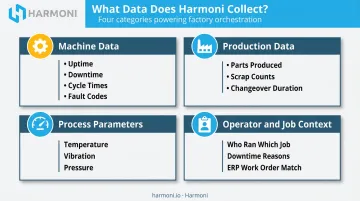
The fourth category is the one most competitors and point solutions miss. Machine data tells you a spindle stopped. Operator and job context data tells you why, who made the call, and whether the job running on that machine matched the work order in the ERP.
Most unplanned downtime traces back to that gap — and it stays invisible without both layers of data.
Start With Your Pain Point, Not Everything
Trying to collect all four categories simultaneously is a reliable way to delay value. Prioritize based on your current problem:
- Unexplained downtime? Start with machine state and downtime reason codes
- Inaccurate job costing? Focus on cycle time capture paired with ERP work order data
- Scrap or quality escapes? Layer in process parameters and digital checksheet data first
One category, proven, buys more organizational trust than four categories implemented poorly.
Manual vs. Automated Data Collection: The 2026 Reality
The Manual Model and Its Limits
The manual data collection model still running across many shops looks like this: operators record part counts on paper travelers, enter downtime reasons into spreadsheets at shift end, and reconstruct what happened based on memory.
The problems are structural, not just inconvenient:
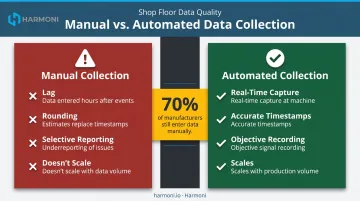
- Lag — data entered hours after events can't drive real-time decisions
- Rounding — operators estimate rather than timestamp; a 47-minute downtime becomes "about an hour"
- Selective reporting — people naturally under-report problems that reflect on their performance
The MLC's finding that 70% of manufacturers still rely on manual entry, while 44% say their data volume has doubled in two years, illustrates the scalability gap directly. Manual entry doesn't scale with data volume — it just creates a bigger gap between what happened and what gets recorded.
The Automated Approach
Those manual gaps point toward an obvious fix: remove the human from the data capture step entirely. Automated data collection uses sensors, PLCs, IIoT gateways, and machine controller outputs to capture data at the point of production — no operator intervention required. The data flows to a central platform for analysis in real time.
Connection methods vary by machine age and type:
- Modern CNCs (Haas NGC, FANUC 30i/31i/32i, Siemens SINUMERIK 828D/840D, HEIDENHAIN TNC7) expose data via MTConnect or OPC UA — though each requires specific software options or server configurations rather than a universal plug-and-play setup
- Older machines typically need external sensors, PLC signal taps, or IIoT gateway hardware
- Mixed fleets often use a combination of both approaches
The Hybrid Truth
Automation handles counting and timestamping. Humans still need to provide context.
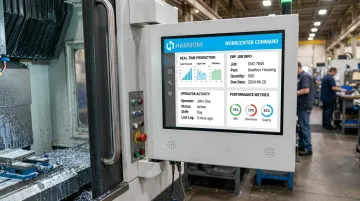
Why did the machine stop? What was the job? Was the scrap a material issue or a setup error? No sensor answers those questions — an operator does. The best 2026 systems make adding that human context fast: a few taps at a machine-side terminal rather than a form filled out at shift end. Platforms like Harmoni put a command center at each workcenter specifically for this — so operators log context in the moment, not hours later from memory.
How to Implement Manufacturing Data Collection in 5 Steps
Step 1: Define Your "Why"
Before selecting sensors or software, identify the specific operational problem driving the initiative. Common starting scenarios:
- Unexplained capacity loss → goal: understand where machine time actually goes
- Inaccurate job costing → goal: capture actual cycle times tied to specific work orders
- Chronic downtime on one machine type → goal: categorize downtime causes with enough detail to prioritize fixes
Your "why" determines which data category to prioritize and which machine to start with. Without it, you'll collect data that answers questions nobody asked.
Step 2: Identify Where Data Delivers the Fastest Value
Start with your worst-performing or most critical machine — the one that, when it goes down or runs slow, causes the most downstream disruption.
A focused proof-of-concept on one workcenter:
- Generates faster ROI than a plant-wide rollout
- Surfaces real integration issues before they affect 40 machines
- Builds internal buy-in with concrete, visible results
- Gives you a validated baseline before you commit to scale
A single proven deployment is more persuasive to leadership than a plant-wide rollout that never quite stabilizes.
Step 3: Choose Your Collection Method
Match your connection approach to your machine type and age:
- Modern CNCs with native output — Haas NGC has built-in MTConnect on TCP port 8082. FANUC requires the FASMTC server software running on a machine-side PC. Mazak's documented solution uses the SmartBox 2.0 hardware. Siemens SINUMERIK requires an OPC UA software option. Verify the specific control generation and license before assuming native compatibility
- Older or closed machines — add proximity or photoelectric sensors, or tap PLC signals non-intrusively
- Mixed fleets — a platform that handles multiple connection types simultaneously reduces integration complexity
For mixed fleets specifically, look for a platform that handles both machine connectivity and ERP integration in one layer. Harmoni, for example, connects natively to Mazak, Haas, FANUC, Heidenhain, Siemens, DMG MORI, and others while pulling job data from ERPs like Epicor, Infor, and JobBoss — giving operators one unified view at each workcenter instead of two disconnected systems.
Step 4: Address Connectivity and Environment
Before installation, assess:
- Network options — Ethernet is most reliable for machine data; Wi-Fi is viable but requires coverage validation near machine enclosures; cellular is an option for remote or difficult-to-wire locations
- Environmental factors — wash-down environments need sealed hardware; machine vibration affects cable routing and sensor mounting; electromagnetic interference near large spindles can disrupt wireless signals
- Non-intrusive principle — the initial setup should require no modifications to existing OT/IT infrastructure. If a vendor's deployment plan starts with reconfiguring your network, that's a red flag
Step 5: Establish Baseline, Validate, Then Scale
Trusting the data is non-negotiable before expanding. In the first weeks:
- Cross-check automated counts against known production records — compare sensor output against a run of parts you can physically count
- Resolve sensor placement issues — a proximity sensor positioned slightly off-center can double-count or miss cycles; find this on one machine, not forty
- Confirm downtime timestamps — verify that state changes in the system match what operators observed at the machine
- Establish baseline OEE — once validated, you have a credible starting point to measure improvement against
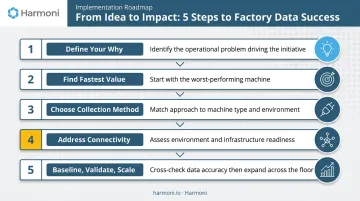
That validated baseline becomes your business case for scaling to additional lines. Without it, you're asking leadership to approve expansion of a system nobody fully trusts yet.
Beyond Data Collection: Why Context Is the Missing Link
Most manufacturers can collect machine data. Machine data alone still can't tell you why a job ran over budget, who was on the machine, or whether the operator had the right revision of the work instructions.
Without that operational context, dashboards become reporting tools. The problem gets identified at the Monday morning meeting, not during Tuesday's third shift when it was still fixable.
What Contextualized Data Looks Like
Contextualized data connects signals that are normally stored in separate systems:
- Machine state linked to the specific ERP work order running at that moment
- Operator identity tied to the shift via RFID, not a manual clock-in
- Downtime reason codes entered in real time at the machine, not reconstructed from memory
- Production counts compared against the job's target cycle time from the ERP — live, not in a post-shift report
IndustryWeek reported that 20% of surveyed manufacturers frequently made poor decisions because data was unavailable, inaccessible, or untrusted. The failure mode isn't usually a lack of data — it's data that arrives too late or lacks the context to be actionable.
The Factory Orchestration Layer
Solving that problem requires more than another monitoring dashboard. A factory orchestration platform sits between the ERP, machines, and operators to coordinate them in real time, distinct from a machine monitoring tool that only reports what machines are doing.
Harmoni is built on this model. It connects machine data from CNCs and PLCs with operator activity captured via long-range RFID, and job data pulled from ERP systems including Epicor, Infor, and JobBoss. The result is a unified view at each workcenter — and for plant managers, real-time visibility into whether production is on track while the job is still running.
When Harmoni was deployed at WessDel, a precision aerospace and defense manufacturer working in beryllium and titanium alloys, the impact was immediate and documented:
- 17 productive hours recovered per employee per month by reducing ERP transaction time from 11 minutes to seconds via RFID automation
- 10% reduction in delinquent jobs — fewer late deliveries, less emergency overtime
- 5X return on ongoing platform costs, with the system fully installed in under a week
MSI, another precision manufacturer, nearly eliminated part count errors on complex high-risk components and shifted from tracking only spindle time to tracking earned hours — giving management an accurate picture of job profitability rather than just machine activity.
When machine data, operator activity, and ERP job records arrive together in real time, plant managers can act on problems during the shift — not reconstruct them after the damage is done.
Common Pitfalls to Avoid
Cybersecurity and IT Alignment
Connecting shop floor machines to a network introduces real security considerations — particularly for aerospace, defense, and healthcare manufacturers. Manufacturing represented approximately 65% of the 657 industrial ransomware incidents recorded in Q2 2025, according to Dragos.
Before selecting any vendor, ask:
- Where is data stored, and who owns it?
- What encryption is used in transit and at rest?
- Is the provider certified to a recognized information security standard?
- Does the platform support segmented OT/IT architecture per NIST SP 800-82 guidance?
Involve your IT department at the beginning — not after a vendor is already selected. Security policy misalignment is what most commonly stalls implementations after a promising start. Harmoni offers a Government Cloud deployment option specifically for defense contractors handling Controlled Unclassified Information, with CMMC and DFARS alignment considerations built in.
Data Accuracy and Trust
Inaccurate data is worse than no data in one specific way: it erodes trust. Once operators and managers stop believing the dashboard, adoption collapses — and rebuilding that trust is harder than building it in the first place.
Validation discipline in the first weeks is what separates a system people use from one that sits ignored. Early on, make sure to:
- Compare automated counts to known outputs
- Resolve sensor placement issues before they compound
- Confirm downtime timestamps match what operators actually observed
It's not glamorous work, but it's what earns trust from the floor up.
Shop Floor Resistance
Operators often interpret new data collection as surveillance, not support. Address this directly:
- Communicate that the system tracks jobs and processes, not individual performance
- Involve operators in defining downtime reason codes — they know what actually causes stops
- Show them how automation removes burdens they already dislike (manual ERP entries, hunting for the right program revision)
Harmoni puts everything an operator needs directly at the machine — the right program, the right work instructions, the right job context. Operators at WessDel and MSI adopted the platform because it made their jobs easier, not because management mandated it.
Trying to Boil the Ocean
A "big bang" implementation — connecting every machine and integrating every system simultaneously — fails more often than it succeeds. Unexpected machine compatibility issues, integration delays, and scope creep kill momentum.
The phased model works: one machine, prove measurable value, then expand with confidence. Starting small isn't a limitation — it's how you build the internal case that funds the next phase.
Frequently Asked Questions
What is the best software for collecting manufacturing data?
There's no single best tool — it depends on your machine types, existing ERP, and what decisions you need to make. Standalone sensors and MES tools handle collection and tracking well. Factory orchestration platforms like Harmoni go further, combining machine data, operator context, and ERP job data so you can understand why production deviated, not just that it did.
What are the most important types of data to collect on the shop floor?
The four core categories are machine status and downtime, production counts and scrap, process parameters, and operator/job context data. The last category is most often overlooked — yet it's the one that enables root cause analysis, because knowing a machine was down for 47 minutes matters less than knowing why, which job it affected, and who was running it.
What is the difference between manual and automated data collection?
Manual collection relies on operators recording data at shift end — it's prone to lag, rounding, and selective reporting. Automated collection uses sensors and IIoT devices to capture data at the machine in real time, enabling live decisions rather than post-shift analysis. The best systems combine both: automation for counting and timestamping, humans for context and reason codes.
How does manufacturing data collection connect to ERP systems?
ERP systems hold job orders, routing, and cost targets. Shop floor collection captures actual performance. Connecting the two lets manufacturers compare planned vs. actual cycle times in real time and produces accurate job costing based on what actually happened, not what got entered manually hours later.
How long does it take to implement a manufacturing data collection system?
A single-machine pilot can go live in days to a few weeks depending on machine type and connectivity. Harmoni's WessDel deployment was fully installed in under a week. Plant-wide rollouts take longer but can be staged incrementally, using each validated phase to build the case for the next.
What is the difference between data collection and factory orchestration?
Data collection captures raw production signals. Factory orchestration uses that data — combined with operator activity and ERP workflows — to actively coordinate people, machines, and systems in real time. The distinction matters: monitoring is retrospective; orchestration gives you the ability to intervene while production is still in progress.