Most failures are predictable. Missed read zones, incompatible tags, and data that never reaches the ERP or MES all trace back to the same root cause: implementation that skipped the planning phases. A cross-functional team — IT, operations, and floor supervisors — is the minimum. For multi-zone deployments, an experienced systems integrator or technology partner is typically worth the engagement cost.
This guide covers the complete, correct approach: from site readiness through post-implementation validation, with the common failure modes and their fixes included.
Key Takeaways
- Define the business problem and integration requirements before purchasing any hardware
- Site surveys are non-negotiable in metal-heavy manufacturing environments
- On-metal RFID tags are mandatory when tagging machinery, tooling, or metal parts
- ERP/MES integration is where most deployments stall: plan for it in week one, not week twelve
- Pilot one zone before scaling; it prevents expensive rework across the full facility
RFID System Implementation Guide
RFID deployment follows a defined sequence: requirements and feasibility → hardware and software selection → site preparation → physical installation and integration → pilot testing → validation and full rollout.
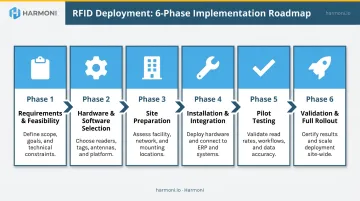
Expect the timeline to match the scope. A single-zone passive UHF system might be operational in a few weeks. A multi-zone deployment integrated with an ERP across an active manufacturing floor typically runs three to six months. The software integration and pilot testing phases are where timelines most often extend.
Prerequisites and Site Readiness
Before any hardware is ordered, four things must be defined:
- Business objective — What specific operational problem does RFID solve? Asset tracking, WIP visibility, labor job detection, inventory control? Vague goals produce vague results.
- Success criteria — What does good look like, expressed in measurable terms?
- Integration targets — Which systems must receive RFID data? ERP, MES, shop floor orchestration platform?
- Go/no-go criteria — Under what conditions does the project pause? Unacceptable read rates due to environmental physics, no viable integration pathway, or an ROI analysis that doesn't hold up are all legitimate stopping points.
The site survey comes next, and it cannot be delegated to a spec sheet. Walk every planned read zone. Document metal structures, CNC machinery, and high-EMI sources.
NIST measurements of TIG arc welding emissions show significant output at 900 MHz — directly overlapping the UHF RFID band used in North American manufacturing (902–928 MHz under FCC Part 15). Test during representative production activity, not during a quiet Saturday walkthrough.
Confirm network infrastructure and power availability at every planned reader location before installation day.
Hardware and Components Required
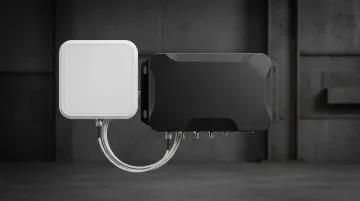
Essential components:
- RFID tags — Passive UHF for most WIP and asset applications; on-metal rated tags required for machinery, tooling, and metal parts
- Fixed or handheld readers — Fixed readers for automated read zones; handheld for audits and flexible zones
- Antennas — Circular polarization where tag orientation varies; linear polarization where orientation is consistent and maximum range matters
- Antenna cables — Shorter is better; coaxial cable introduces signal loss that compounds with length (LMR-240 loses roughly 0.25 dB per meter at 900 MHz)
- Mounting hardware — Readers and antennas need secure, vibration-resistant mounting in manufacturing environments
Optional but often valuable:
- GPIO devices (stack lights, trigger signals)
- RFID portals at dock doors or workcenter entries
- RFID printers for on-demand tag encoding
On-metal tags specifically: Standard inlay tags fail when placed directly on metal surfaces — the metal detunes the tag antenna. Zebra, Brady, and Beontag all offer on-metal rated UHF tags engineered with a spacer layer. Zebra's Silverline on-metal line specifies up to 15 m read range under FCC frequencies for its Classic II model — though real shop-floor performance depends on environment. Validate tag selection on the actual item in the actual environment, not from a datasheet.
How to Implement an RFID System (Step-by-Step)
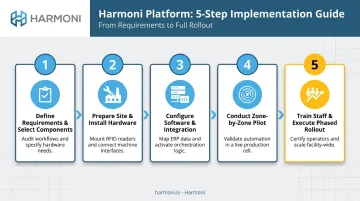
Step 1: Define requirements and select components
Formalize the business problem in writing. Identify all read zones and test candidate tags on actual parts in the actual environment. Select readers and antennas based on required read range and zone geometry. Involve the software or platform team at this stage — integration requirements should shape hardware decisions, not the reverse.
Step 2: Prepare the site and install hardware
Mount readers and antennas at pre-surveyed positions. Run and label all antenna cables. Confirm power and network at each reader location. Establish baseline reader settings (transmit power, session mode) before any tags are introduced into the environment.
Step 3: Configure software and integration
Deploy middleware or connect readers directly to the target platform — ERP, MES, or a factory orchestration layer. As Zebra's integration guidance makes clear, RFID readers generate fast, continuous data while ERP systems expect structured transactions; middleware must bridge this gap. Map tag IDs to the correct data objects: job numbers, operator badges, part serial numbers.
Platforms like Harmoni can handle this orchestration layer directly — automatically associating RFID-detected employees and jobs with live ERP workflows, triggering automated CNC program loading, and surfacing real-time job status without manual data entry at the workcenter.
Step 4: Conduct a zone-by-zone pilot
Activate one read zone at a time. Test for read rate within the intended zone, stray reads from adjacent zones, and data accuracy in the connected system. Document reader settings for each tuned zone as a configuration baseline before moving to the next zone.
Step 5: Train staff and execute phased rollout
Train operators and supervisors on how RFID interacts with their workflows before expanding beyond the pilot zone. Roll out additional zones progressively. Use pilot zone learnings — tuning decisions, interference patterns, edge cases — to accelerate configuration in each new area.
Post-Implementation Validation
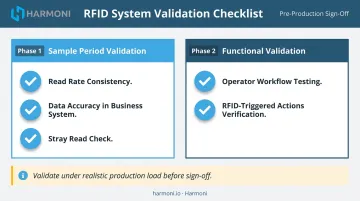
Declaring a zone operational after a single test pass is a mistake. Validate over a defined sample period under realistic production load. Specifically:
- Read rate consistency — Not just one good run; sustained performance across a representative sample
- Data accuracy in the business system — Confirm records are appearing correctly and on time in the ERP or MES
- Stray read check — Deliberately place tags outside the intended zone boundary and confirm they are not captured
Then run functional validation with real operators completing real workflows. Confirm that RFID-triggered actions — job start, job completion, part location update — fire correctly without manual intervention.
Even systems that pass functional validation can degrade once production scales — tag volume increases, traffic intensifies, and environmental conditions shift (new equipment installed nearby, seasonal temperature changes all affect RF performance). Sign off only after validating under that realistic load. Problems caught here take hours to fix. The same problems discovered mid-production take days, plus the rework.
Common RFID Implementation Problems and Fixes
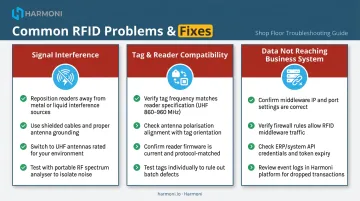
Most RFID implementation problems fall into three categories: signal interference, hardware incompatibility, and integration failure — and each one has a clear fix.
Signal Interference from Metal and Machinery
Tag read rates drop near metal parts, fixtures, or CNC machinery because standard tags detune on metal surfaces. Motors, welders, and nearby Wi-Fi equipment add EMI that further degrades the RF field — and antennas placed too close to metal structures create reflection and dead zones.
Fix:
- Replace standard tags with on-metal rated tags that include a spacer layer
- Reposition antennas away from large metal reflectors
- Map interference sources during the site survey
- Where possible, schedule RFID reads to avoid overlap with peak EMI operations like active welding
Tag and Reader Compatibility Issues
Even in low-interference environments, inconsistent read rates often point to a compatibility gap rather than a signal problem. Tags may use a mismatched chip protocol or frequency, carry the wrong form factor for the substrate, or run against outdated reader firmware — and antenna polarization misaligned with the tag antenna orientation compounds all of these.
Fix:
- Verify that tags and readers both conform to EPC Gen2 / ISO 18000-6C
- Test multiple tag models on the actual item before committing to a SKU
- Update reader firmware
- Test both linear and circular polarization antennas to find optimal orientation
Data Not Reaching the Business System
When reads are confirmed at the reader but data doesn't appear in the ERP or MES, the problem is almost always in the integration layer. Common causes include middleware misconfiguration, missing API mapping between tag IDs and business records, network firewalls blocking reader-to-server traffic, or a format mismatch between RFID output and the system's input schema.
Fix:
- Validate the full data path — reader → middleware → application — in a test environment before live deployment
- Pre-map tag IDs to the correct business records
- Confirm network ports and protocols are open and aligned
- Involve the software integration team during hardware commissioning, not after it
Pro Tips for Implementing RFID Effectively
Run a proof of concept before full hardware procurement. A development kit and a handful of tags tested in the target environment will reshape hardware decisions. Findings from basic testing consistently prevent expensive post-installation changes.
Document every tuned zone configuration. Record reader power settings, antenna placement, tag type, and achieved read rate for each zone. This baseline is essential when troubleshooting future degradation or replicating the setup elsewhere in the facility.
Plan integration from day one. RFID data has no value if it doesn't reach the systems operators and managers use. In CNC machining and precision manufacturing environments, the RFID layer must communicate with ERP job tracking, MES workflows, or a factory orchestration platform.
Harmoni, for example, connects RFID-based employee and job detection directly to live ERP data and machine status, automatically triggering:
- Job clock-ins tied to operator badge reads
- CNC program loads at the machine
- Work instruction delivery without manual intervention
If your shop runs Epicor, Infor, JobBoss, or a similar ERP, evaluate whether a purpose-built orchestration layer handles this integration before committing to hardware.
Engage a specialist for site survey and pilot tuning. RFID professionals identify interference sources and antenna placement issues in hours that an in-house team might spend weeks troubleshooting.
Conclusion
RFID implementation quality in manufacturing directly determines whether the system delivers. Poor site preparation, wrong tag selection, and disconnected software integration will undermine even well-specified hardware.
The sequence that works: define requirements before ordering hardware, pilot before scaling, validate before going live, and treat ERP or MES integration as a core deliverable — not an afterthought. Shops that hold to this discipline get systems that perform as designed. Those that skip steps routinely spend months untangling problems that a structured rollout would have caught in week one.
Frequently Asked Questions
How much does RFID implementation cost?
Costs vary significantly based on scope, tag type, number of read zones, and integration complexity. Both startup costs (hardware, software, installation, integration) and recurring costs (tags, maintenance, support) factor into the total. Get vendor quotes against a defined system scope — generic estimates are rarely useful for planning.
How long does it take to implement an RFID system?
A single-zone passive UHF system can be operational in weeks. A multi-zone, ERP-integrated manufacturing deployment typically takes three to six months. Pilot testing and software integration cause most timeline delays.
What RFID frequency works best in a manufacturing environment?
UHF RFID (902–928 MHz in North America) is the standard for manufacturing due to its read range and throughput. LF or HF may suit specific applications like proximity-based access control but are not practical for high-volume WIP or asset tracking across a shop floor.
Can RFID work reliably around metal machinery and equipment?
Yes, with the right tag selection and antenna placement strategy. On-metal rated tags are required when tagging metal surfaces. Thorough site testing is non-negotiable because metal-heavy environments significantly affect read performance and require environment-specific tuning.
Do I need custom software for an RFID system?
Commercial middleware covers common use cases, but manufacturing environments with ERP or MES integration requirements typically need configured or custom integration work. Define software requirements before hardware selection — software needs should shape architecture decisions from the start.
What is the difference between passive and active RFID tags for manufacturing?
Passive tags have no battery, cost less, and read only when within range of a powered reader — suitable for most WIP and asset tracking. Active tags include an onboard power source with longer read range and real-time location capability, but cost significantly more and require battery maintenance across large-area deployments.